

Before FluentPlayer existed, we used to run Presto Player on the Fluent Forms site, one of WPManageNinja’s other products. It played video fine. But CRM integration, chapters, and even logo branding sat behind the Pro tier.
But as helping a small business grow is a core principle across WPManageNinja’s products, I’ve always felt these features should be on the free plan. FluentPlayer made that real.
If you’re new to either tool, both do a solid job putting video on a WordPress site. What follows lays out where they actually differ.
I have my own biases here, working on FluentPlayer makes that unavoidable. But I’ve laid out the metrics and the situations so you can decide for yourself, not take my word for it.
Let’s get into the comparison.
TL;DR
- FluentPlayer’s free plan includes CRM integration, chapters, and logo branding, all three sit behind Presto Player’s Pro tier
- Presto Player’s free plan can’t capture an email, but is available in all paid plans.
- FluentPlayer places interactive layers at an exact timestamp and can target new visitors specifically, Presto Player only offers a watch-percentage trigger
- FluentPlayer triggers FluentCRM automations directly from a video, Presto Player has no equivalent inside the plugin
- Presto Player Pro’s dynamic watermark and per-session private links for self-hosted video are real advantages worth a look if content leakage is your main concern
- Agencies running many sites with no CRM tied to them may find Presto Player’s lifetime pricing works out cheaper per site
At a Glance: Which One Fits You
| If you’re… | Go with |
|---|---|
| Just starting out with video | FluentPlayer (Free) |
| Already running FluentCRM or Fluent Forms | FluentPlayer (Free) |
| Want independent control over player and button colors | FluentPlayer (Free) |
| Building a tutorial or course that needs chapters | FluentPlayer (Free) |
| Want to target new visitors differently from returning ones without annoying either | FluentPlayer (Pro) |
| Want lead capture that automatically triggers CRM workflows | FluentPlayer (Free) |
| Need precise, timestamp-based layer timing rather than a watch percentage | FluentPlayer (Free) |
| Hosting on Bunny, Mux, Gumlet, or Cloudflare and want signed-URL protection across all of them | FluentPlayer (Pro) |
| Protecting paid course content that’s self-hosted | Presto Player (Pro) |
| Need a dynamic, moving watermark | Presto Player (Pro) |
What Made Presto Player Popular
The numbers behind the reputation
The install base backs up the reputation before a single review does:
- 100,000+ active WordPress installs
- 4.8 out of 5 rating across 342 WordPress.org reviews
- 317 of those 339 reviews are five stars
What users specifically praise
The praise holds up under a closer look, not just goodwill toward the founder:
- Setup lives right inside the Gutenberg editor, no separate dashboard to learn
- Works with every major page builder: Elementor, Beaver Builder, Divi, Spectra, Thrive Architect
- LearnDash video progression tracking, called out specifically by course creators
- Reliability at real scale: one reviewer walked back an earlier three-star complaint after adding 500-plus videos and 100-plus playlists, calling the plugin “absolutely great to work with”
That reputation is earned. It’s also exactly why the rest of this comparison matters: a good player with a devoted audience is still worth checking against one built to do more with what that audience already has running.
Why Users Are Switching from Presto Player
Users switch because a great video player and a connected one are not the same thing. Helmar, a Presto Player customer of many years, put it plainly in a five-star FluentPlayer review titled “Ambitious venture, masterfully executed”:
“Let’s face it: there is no shortage of professional video players on the market. I’ve been a Presto Player customer for many years. But it’s one thing having a great player, and another having a great player that is beautifully integrated into an eco-system, and that’s what WPMN offers…” — Helmar, WordPress.org
That’s a long-term Presto Player customer, not a plant, saying the player itself was never the problem.
The other pattern shows up in Presto Player’s own support queue and reviews: an open GDPR compatibility complaint, a report titled “Presto Player 3 breaks page speed,” and a two-star review calling it a “bloated plugin” that “slows down site.” None of these make Presto Player a bad player. They’re the kind of friction that adds up once a site runs more than one plugin, more than one tool, and more than one deadline.
Cost adds to it for agencies managing more than a couple of builds: one third-party review flagged Presto Player Pro’s 25-site cap as “on the lower end” for a real client list.
None of this erases what Presto Player does well. It means the switch is rarely about the player. It’s about everything the video is supposed to plug into once it’s live.
What FluentPlayer Is Built On
Presto Player earned its reputation on its own. FluentPlayer hasn’t been around long enough to earn the same thing yet, and I’d rather say that plainly than dress it up. What it does have is the company behind it, and that’s worth stating with real numbers instead of the word “ecosystem.”
The numbers behind the company
WPManageNinja has built WordPress plugins since 2016. Fluent Forms, the form builder FluentPlayer’s Forms layer connects to, runs on more than 700,000 active WordPress installs. FluentCRM, the CRM every FluentPlayer captures layer routes into, has 70,000+ active installs and a 4.8 rating on WordPress.org. FluentCommunity, the newest of the three, crossed 7,000+ active installs in its first year with a 4.8 rating of its own.
Why that matters more than the word “ecosystem” would suggest
FluentPlayer’s integrations aren’t a video player reaching out to make friends with bigger products. They’re built by the same team that maintains the other end of every one of those connections. That’s the actual reason a captured lead lands in FluentCRM without a bridge, or a video can gate itself to a FluentCommunity course without an API key, the people who built the capture layer also built the CRM it feeds.
None of this makes FluentPlayer better on its own; a newer product still building its own reviews sits next to Presto Player’s 100,000+ installs and years of reviews, and that gap is real. What it does mean is that the free plan’s CRM integration, chapters, and branding aren’t features bolted on to win a checklist. They’re what a video player looks like when it’s built inside a company that already runs a CRM, a form builder, and a community platform every day.
How I Evaluated
Here’s what I checked, across documentation and hands-on testing:
What’s actually free, what’s Pro, and the site-cap math once you pay.
Whether a connection lives in the same codebase or gets bolted on through a third-party tool.
Interactive layers, capture options, and how precisely you can target when they appear.
What each dashboard actually shows, not just whether one exists.
Page load behavior with a video embedded.
How each handles private video, a different need than starting out.
Not a spec question, whether the free plan alone gets a first-time video user to something working.
I also ran two workflows hands-on, since a feature list doesn’t tell you how something feels to actually build. First: gate a video behind email capture and route the contact into a CRM, free plan only on both sides. Second: add chapters to a multi-section tutorial and apply branding, also free plan only. Those two map to the seventh metric above, they’re the two things a business does first with video.
One thing I’d like to comment about before starting, the performance of both plugins lazy-load by default, and I didn’t find a meaningful difference on page load with a video embedded.
Everything else, the workflow verdicts, the feature-by-feature detail, and where each product actually wins, is in the comparison that follows.
Where FluentPlayer and Presto Player Actually Differ
Branding: independent controls versus linked ones
FluentPlayer’s branding colors are independent. Presto Player’s are linked together.
This is where the branding half of my free-plan workflow test landed. On FluentPlayer, I can change brand color, control bar color, play button color, and play button background independently. On Presto Player, they’re linked, change one and the others move with it.
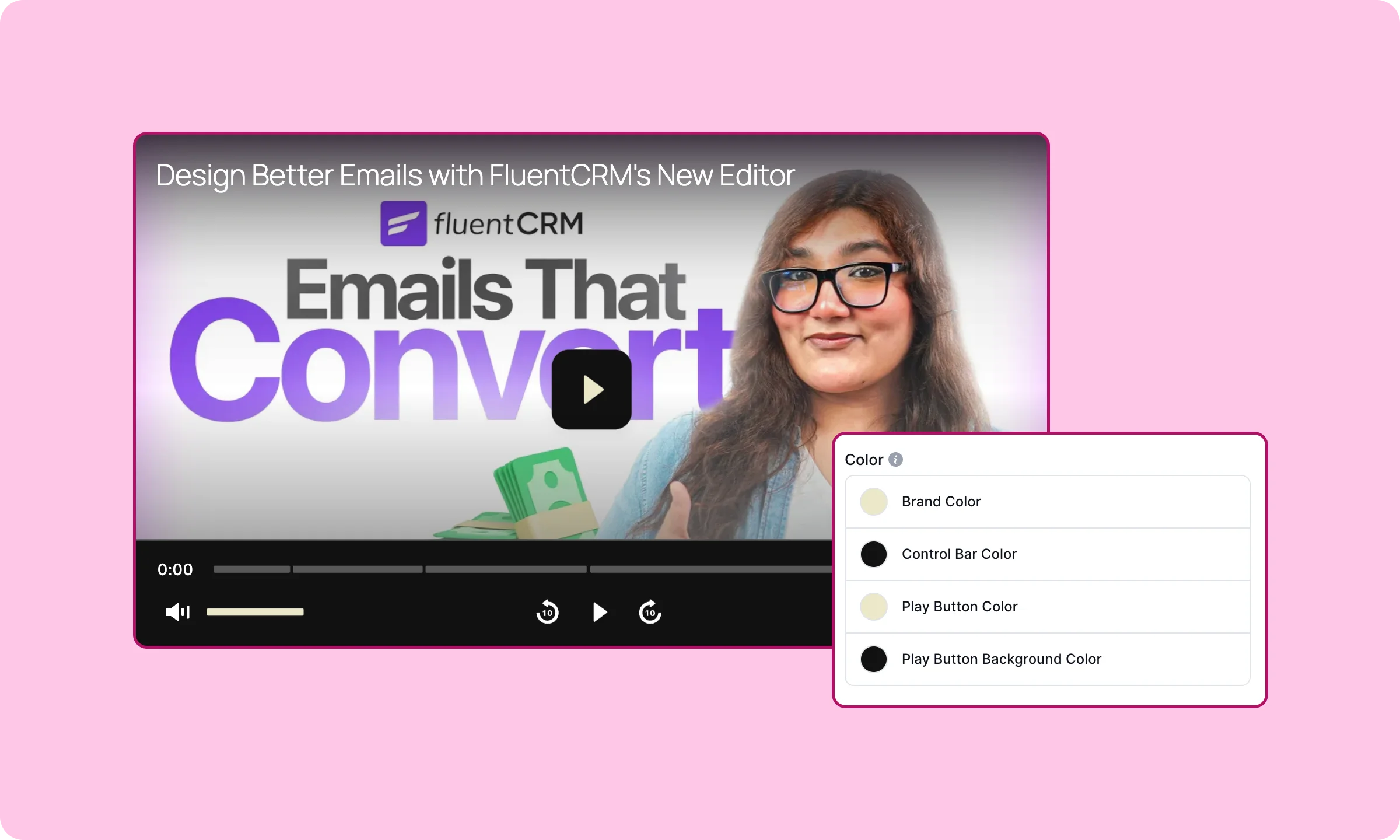
That’s not just cosmetic. Presto Player’s play button defaults to white, and I’ve run into it disappearing against a lighter background with no way to fix just that one element. Branding a lighter player turns into a workaround instead of a setting.
Chapters: built for iteration versus built for planning ahead
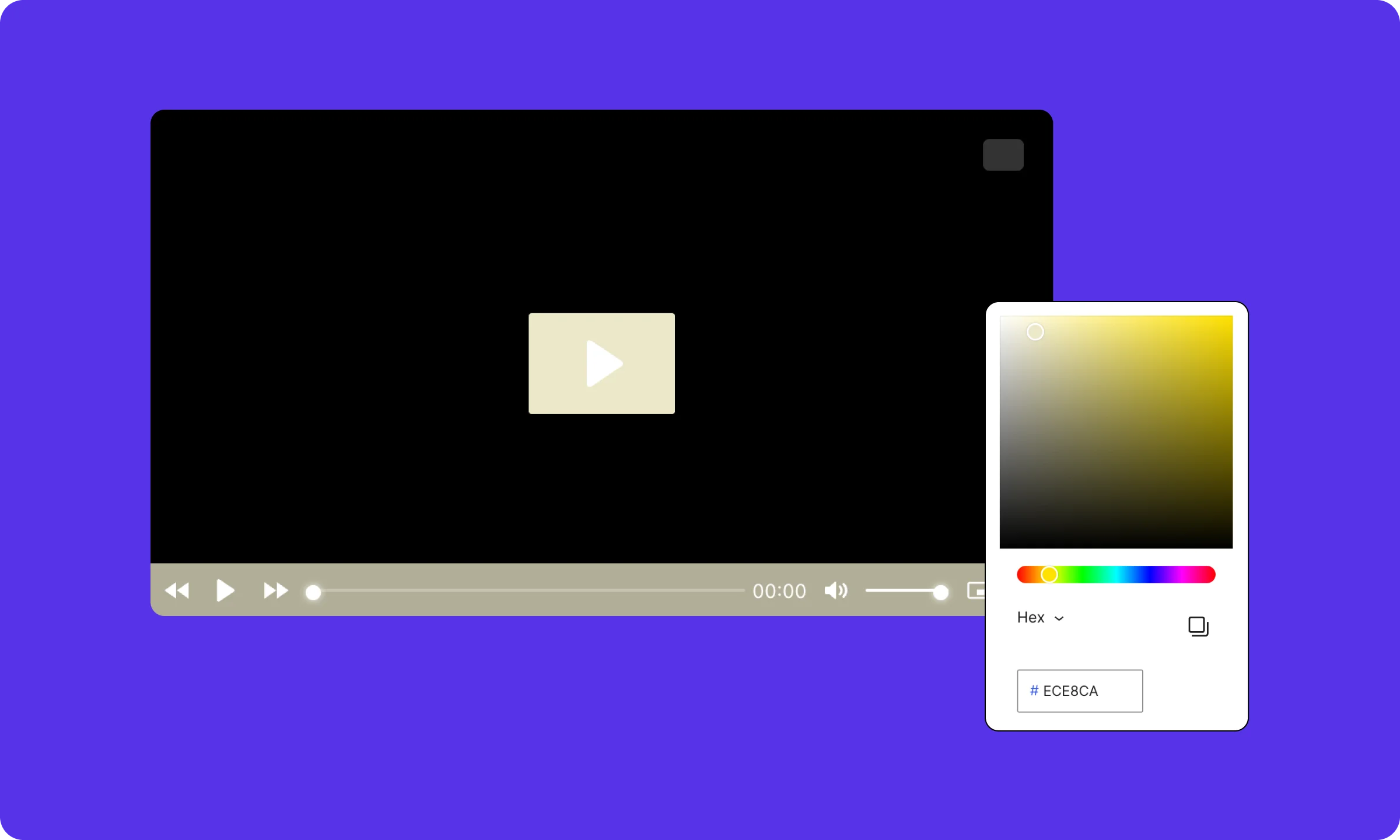
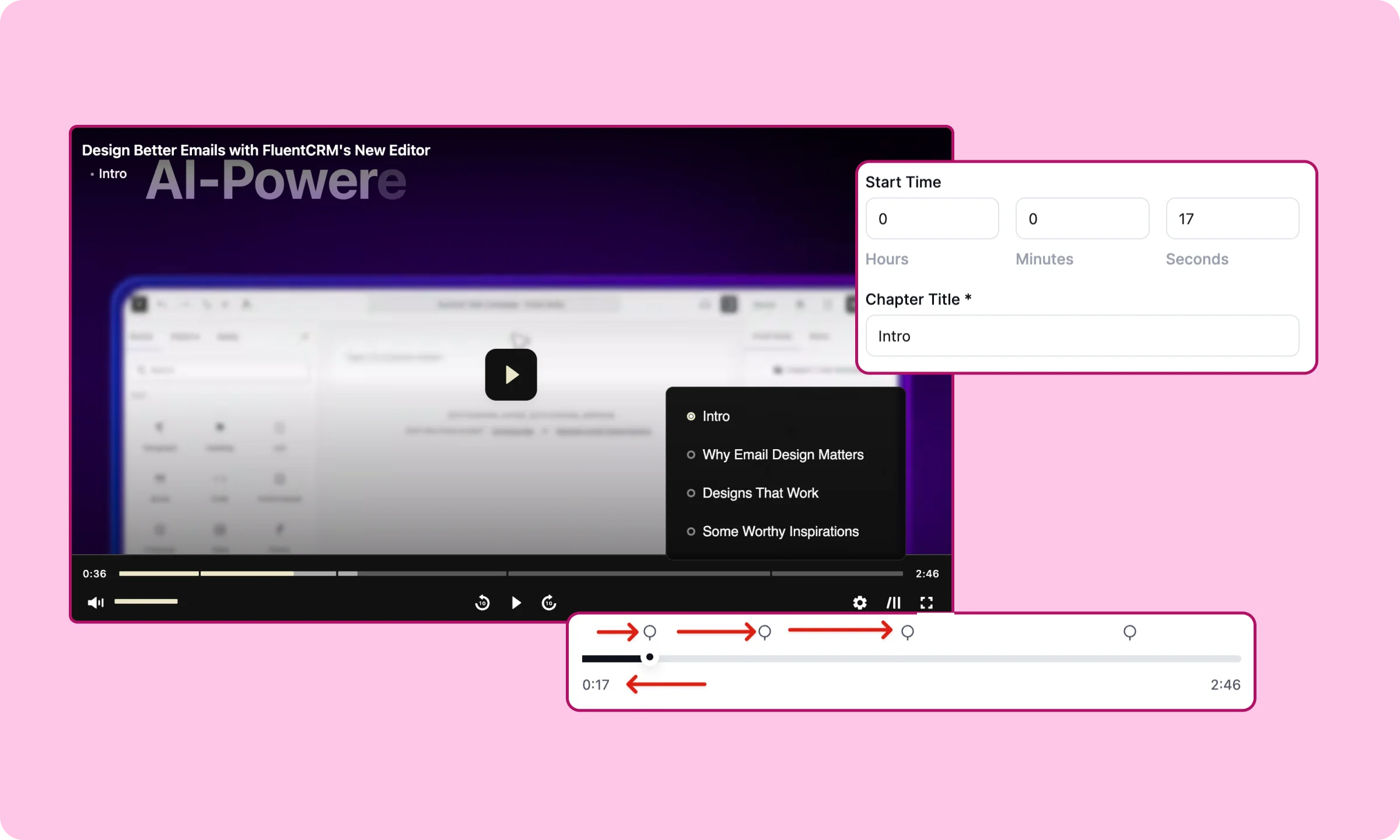
FluentPlayer lets you set chapters by dragging a slider. Presto Player makes you plan them in advance and type them in.
This is the other half of that same workflow, adding chapters to a tutorial on the free plan. Presto Player wants you to plan chapters before you ever open the plugin. I had to write out timings first, type them in manually, then leave the editor and load the full page just to see where a chapter actually landed. I wanted at least one faster way to do this, and there isn’t one.
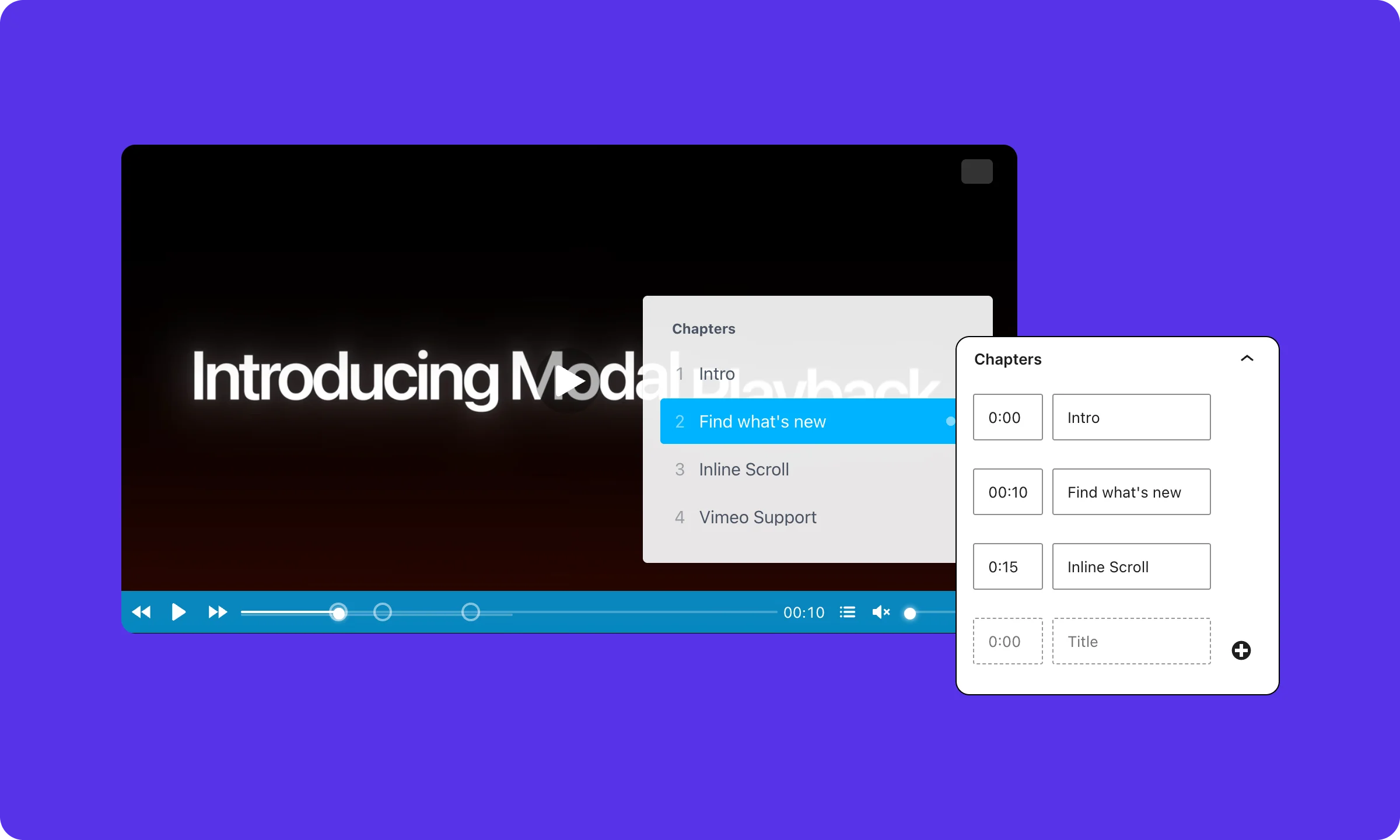
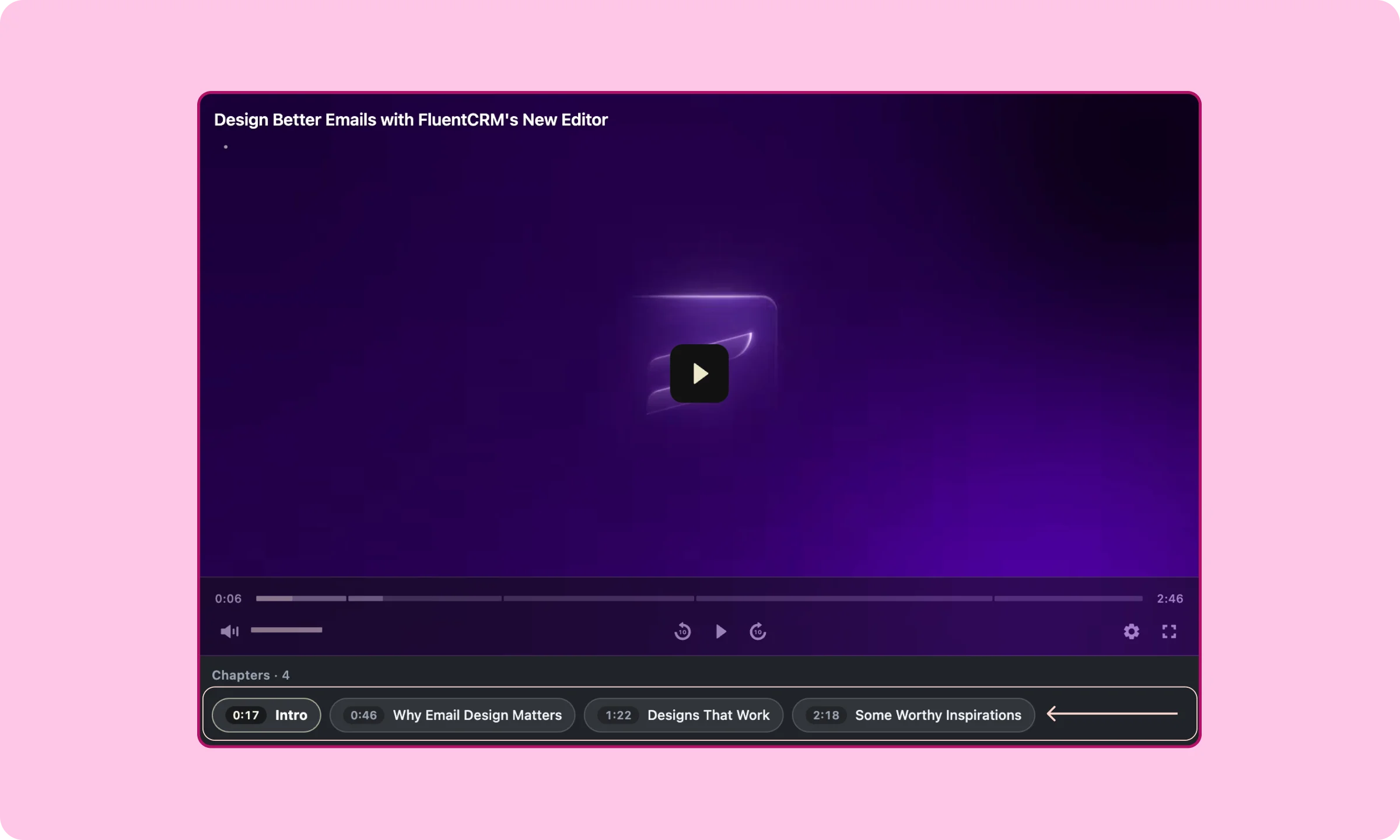
FluentPlayer let me drag a slider to the moment I wanted, watching the preview update as I went, adding or removing chapters without leaving the screen.
It also gives me a second display type beyond the default: an inline scrolling layout that’s cleaner to scan while a video plays. Presto Player only ships the default one.
Interactive layers: timestamp precision and who actually sees them
FluentPlayer targets an exact timestamp and specific viewers. Presto Player only offers a watch percentage.
I’ll be honest about one friction point on Presto Player’s side: interactive layers weren’t obvious to me in the right-side panel at first glance. It read as confusing before I knew where to look.
Presto Player places email capture and CTA layers at a percentage of the video, 50 percent watched, for example.
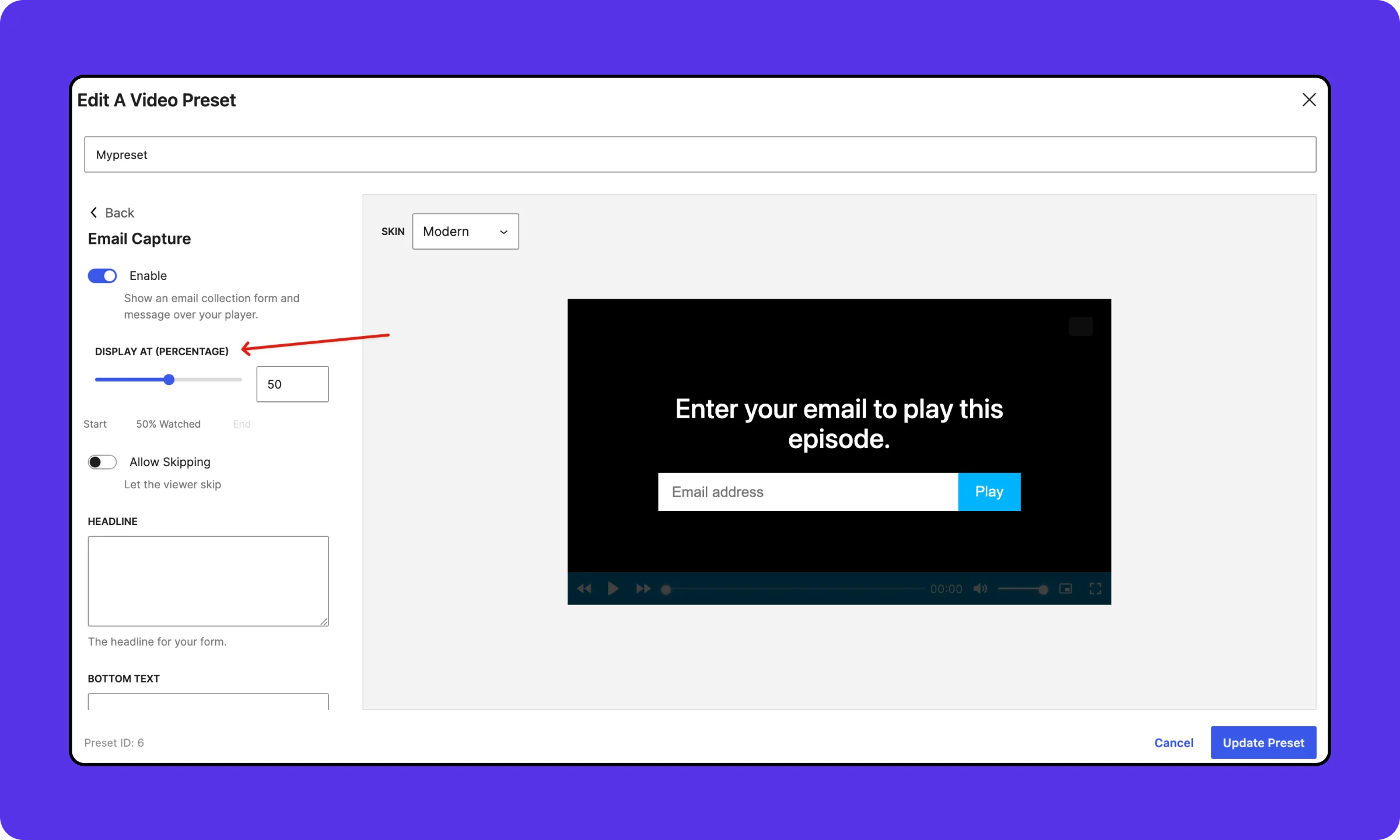
That’s a reasonable proxy for engagement, but FluentPlayer places layers at an exact timestamp instead, so a layer can match a specific scene rather than land wherever that percentage happens to fall in a given video’s length.
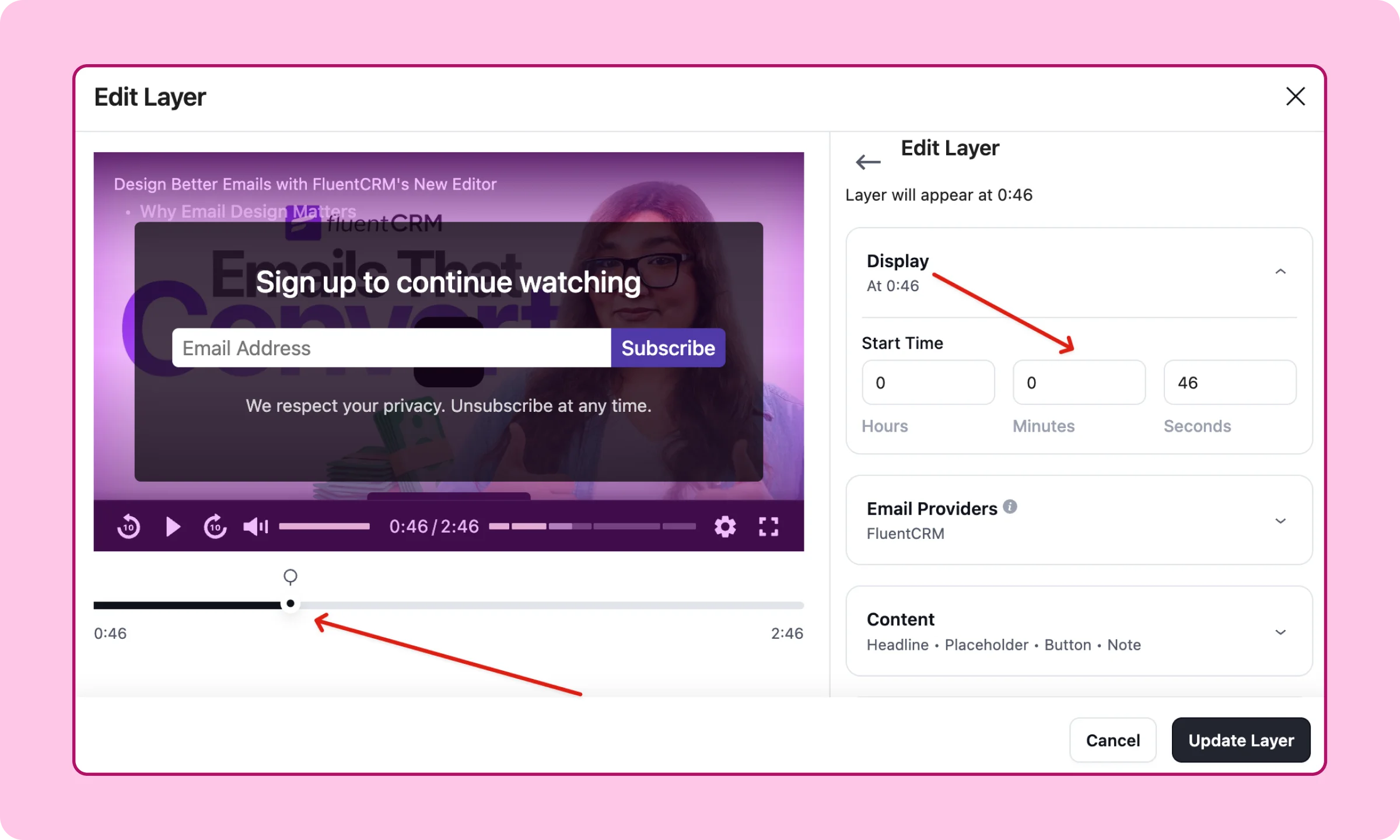
FluentPlayer Pro also lets me set conditions for who sees a layer at all: whether the viewer is logged in, is a CRM contact, holds a specific CRM tag, sits on a CRM list, has already submitted the form, or has already seen or completed that same layer.
That last condition is the one that matters day to day. It let me target a new visitor specifically, without showing the same prompt to someone who already converted or already watched it.
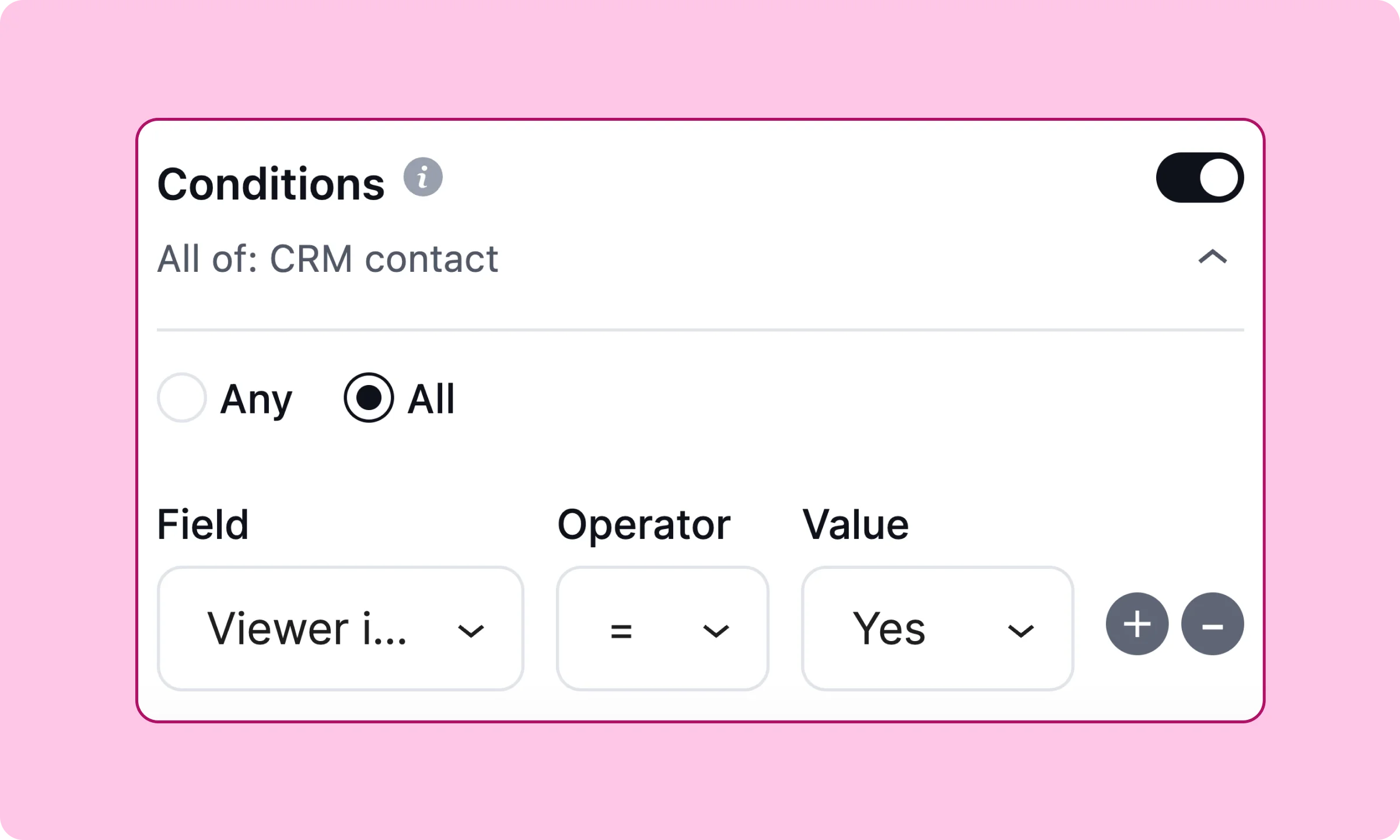
A caveat here is, Presto Player offers email capture only in the paid plans, whereas FluentPlayer treats it as a core free feature.
CRM automation: a trigger Presto Player doesn’t have
FluentPlayer triggers FluentCRM automations directly from a video. Presto Player stops at adding the contact.
This is the other half of that same lead-capture test, what happens once someone actually submits. FluentPlayer registers two automation triggers inside FluentCRM: Media Milestone Reached and Media Layer Interaction.
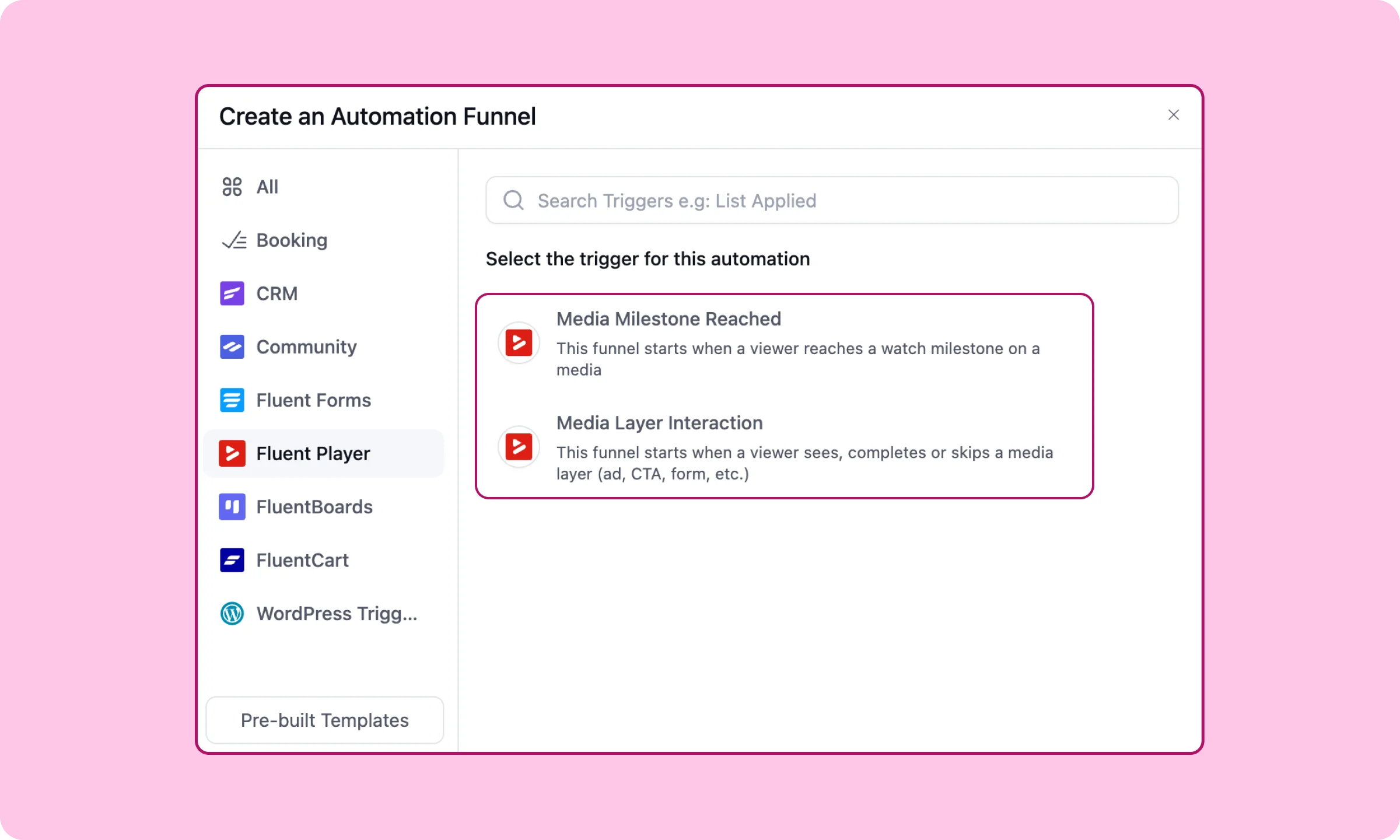
Either one can start an automation the moment a viewer hits a chosen point in a video or interacts with a layer, no Zapier, no webhook, no separate setup outside FluentCRM’s own automation builder.
One setup step is easy to miss: FluentCRM’s Event Tracking Module, and FluentPlayer contact timeline have to be turned on before these triggers show up.
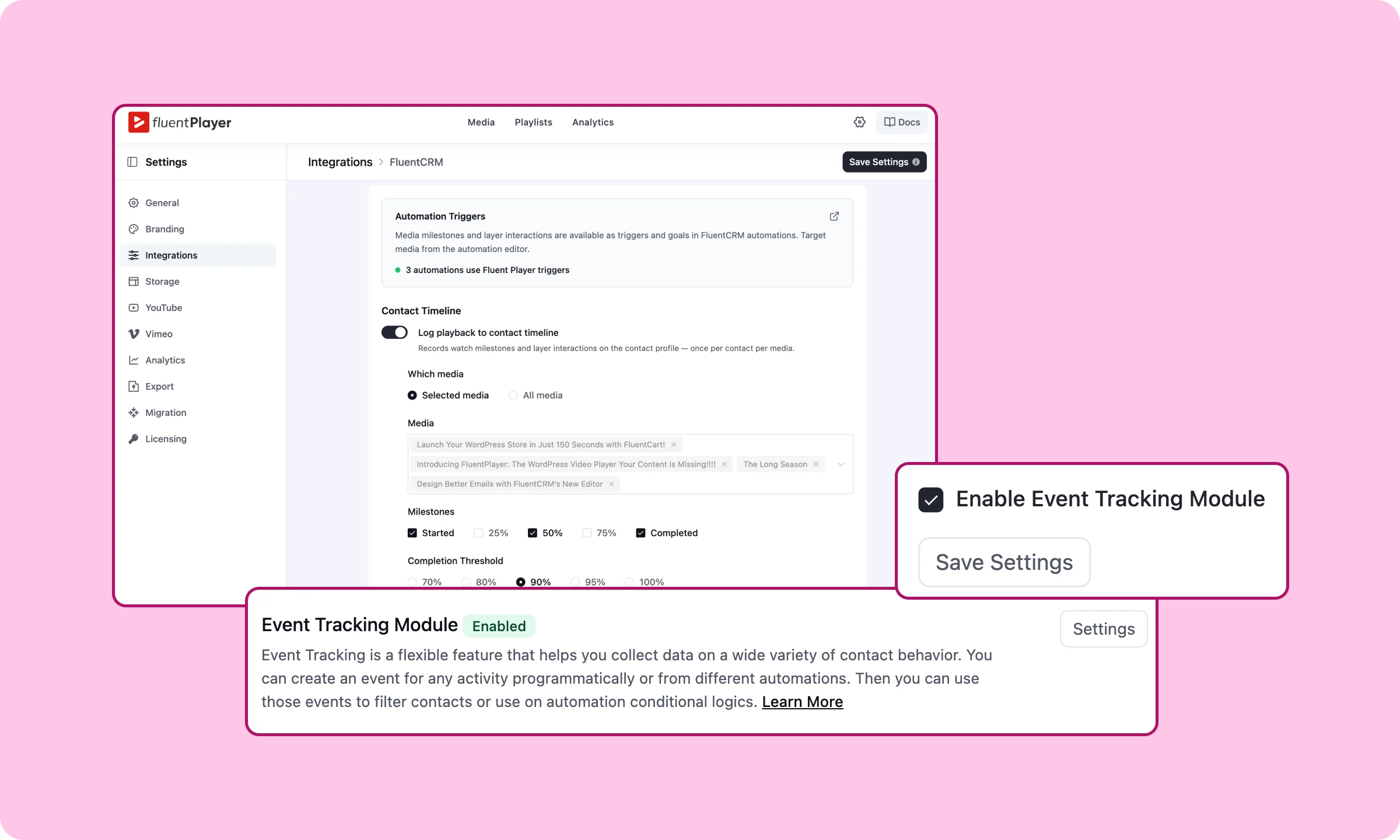
Presto Player does connect to FluentCRM, its own pricing page lists it as a native Pro integration, but that connection stops at adding the contact.
There’s no equivalent to triggering an automation from a milestone or a layer interaction. What happens after the email lands in FluentCRM is a separate step, on a separate tool, because that connection doesn’t exist inside the plugin itself.
Integrations: ecosystem advantage and more
FluentPlayer’s CRM, forms, and community connections are all free and built in, and the same forms layer can take a payment. Presto Player’s are Pro, community isn’t covered at all, and neither is taking money.
FluentPlayer groups FluentCRM, FluentCommunity, and Fluent Forms; the products from Fluent Ecosystem, under one category on its own integrations page, Sales and Lead Capture. All three are free.
A video can sync a captured lead straight into a FluentCRM list, gate itself to a specific course or community space, or embed a full Fluent Forms form as an interactive layer, all without a third-party bridge and without paying.
It also offers integration with Mailchimp, Google Analytics, LearnDash, Webhooks, hosting services and popular page builders.
Explore FluentPlayer Integrations →
Presto Player’s integrations page lists no community platform at all, and nothing that embeds a form inside the player. Its lead capture options are third-party email tools, Mailchimp, MailerLite, ActiveCampaign, and FluentCRM among them, plus generic automation bridges like OttoKit, AutomatorWP, and Uncanny Automator that connect Presto Player to other tools rather than build the connection in.
Worth pointing out directly: Presto Player does integrate with FluentCRM, a WPManageNinja product, but it sits behind Pro and stops at adding a contact. The same connection on FluentPlayer is free, and it’s one piece of a larger set instead of a standalone bridge.
That Fluent Forms connection goes further than lead capture. Fluent Forms supports payment fields, so the same in-video layer can take a payment, a viewer can buy a course, pay for a webinar seat, or complete a paid registration without ever leaving the video. Presto Player has no forms layer at all, so this isn’t a feature Presto Player is missing, it’s a capability its architecture has no path toward without building one from scratch.
The Shortcode layer extends this further. It can embed a FluentBooking calendar directly inside a video, so a viewer can book a call without leaving the player. It’s also a part of the Fluent Ecosystem.
FluentBooking isn’t listed on FluentPlayer’s own integrations page as its own category, the connection works because Shortcode accepts any WordPress shortcode, and FluentBooking happens to be built by the same team as everything else on this list.
Analytics: same basics, more depth on one side
At the level where both products actually go deep, one video’s own analytics page, FluentPlayer’s shows five things Presto Player’s doesn’t: completion rate, per-source performance, device distribution, location breakdown, and a top-viewers list. Audience retention is the one thing both share.
I have live data for both, not documentation claims, so here’s exactly what each shows.
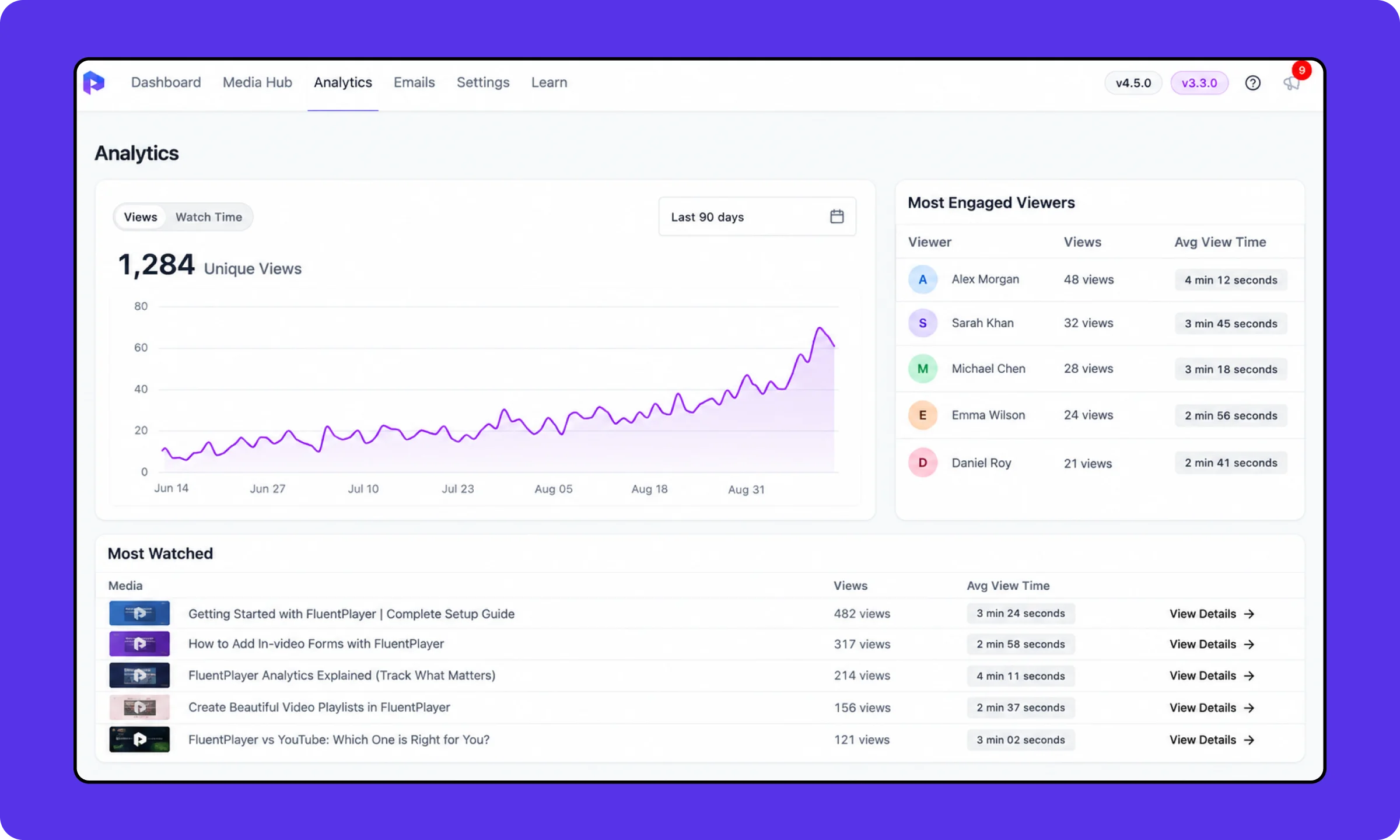
Presto Player’s dashboard covers unique views, a views-over-time trend line, a “Most Engaged Viewers” table ranking the top five viewers by name with view count and average view time, and a “Most Watched” table doing the same for videos. That’s a real, useful set of numbers, and it covers what most people check first.
FluentPlayer’s dashboard starts in the same place, views, unique viewers, average watch time, then adds a completion rate on every summary card and every video row, something Presto Player’s dashboard doesn’t show at all. It also breaks the same time-series chart down by source, YouTube, Vimeo and self-hosted against each CDN, rather than one blended line.
Beyond that: a device distribution chart, a location breakdown by state, an audience retention curve tracking the drop-off through a video’s runtime, and a new-versus-returning viewer split.
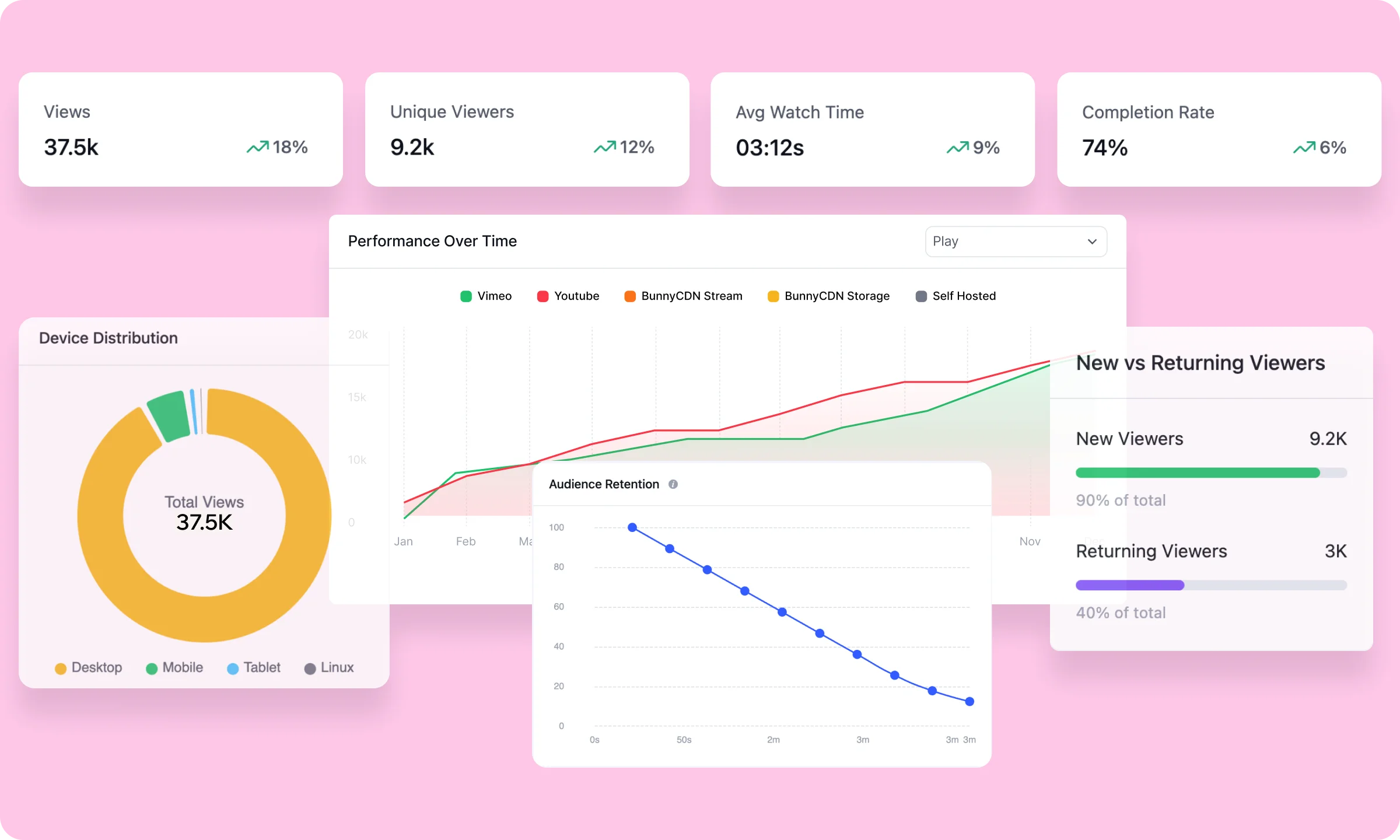
One point of real parity worth stating plainly: both connect to Google Analytics as an external option, so that’s not a place either one pulls ahead.
Presto Player’s dashboard isn’t thin, it answers who’s watching and what they’re watching clearly. FluentPlayer answers that same question, then adds where they’re watching from, what device, whether they finish, and whether they’re new.
Upgrade to FluentPlayer Pro for Video Analytics →
Overlays: more positions, and movement built in
FluentPlayer has four overlay positions plus movement, Presto Player offers less.
Both plugins do the same basic job with text and button overlays, placing a message with a link over the video. Presto Player gives me two corner positions.
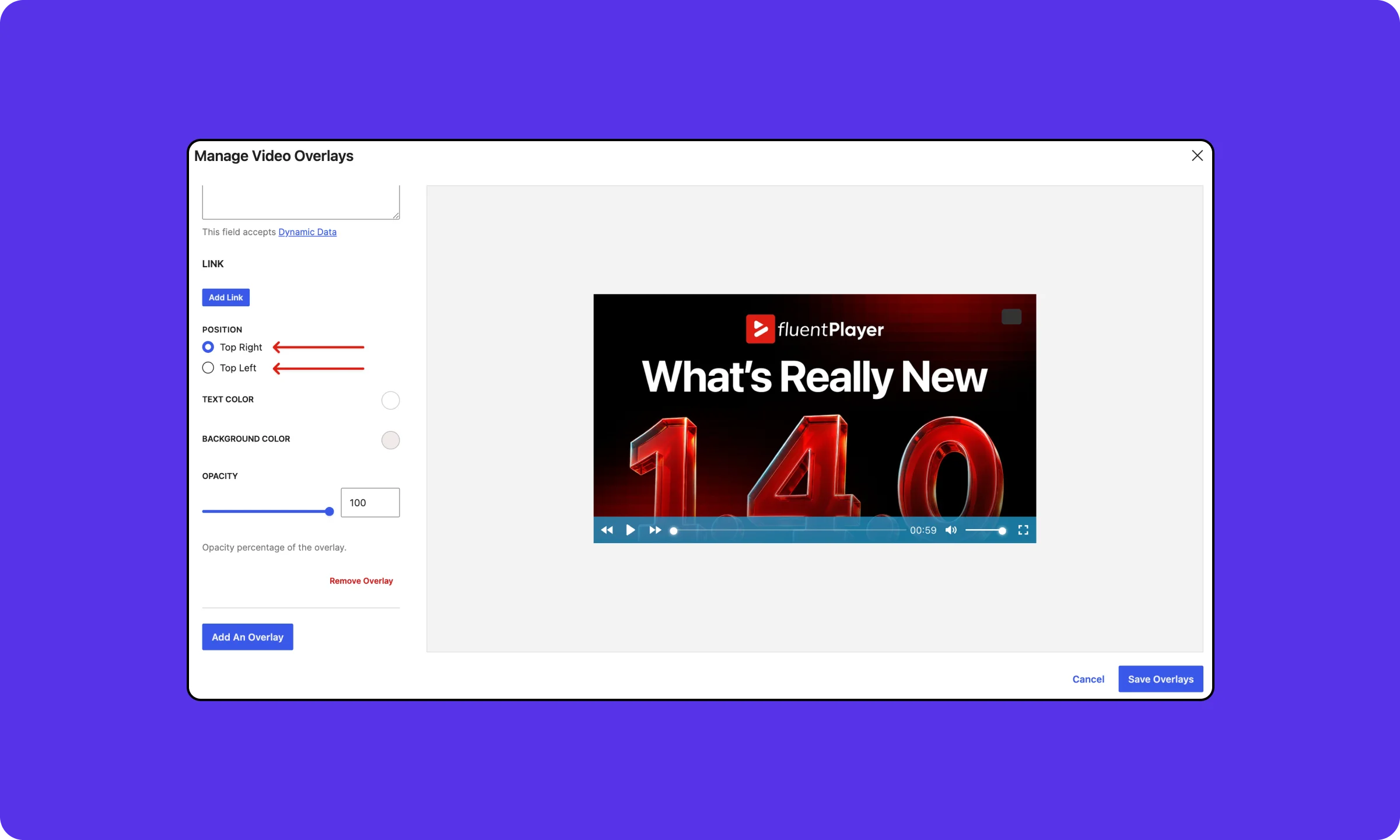
FluentPlayer gives me four, plus something Presto Player doesn’t have at all: a reposition interval that moves the overlay to a new spot at intervals through playback, with a choice of slide, fade, or instant animation.
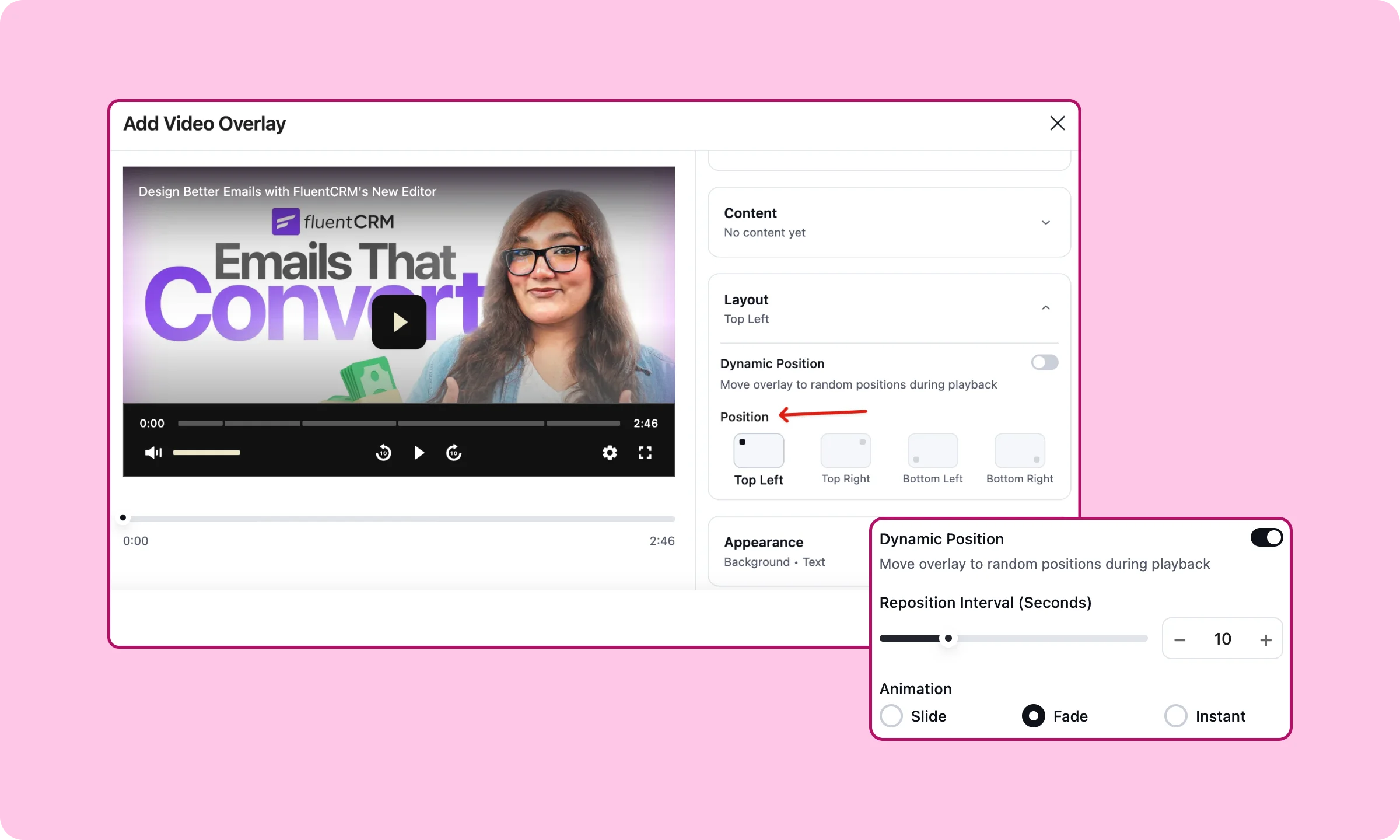
Two corners on their own wouldn’t bother me much. The dynamic repositioning is the real difference, it gives an overlay a reason to hold attention through a longer video instead of fading into the background after the first few seconds.
Timed content: a different kind of layer
This is one I haven’t found any equivalent for on Presto Player.
Instead of overlaying something on the video, FluentPlayer’s Timed Content renders a full WordPress block region below the player that changes as the video plays. Set a time range, and whatever block sits there, a form, a CTA, a product card, a list of key takeaways, appears in sync with that part of the video.
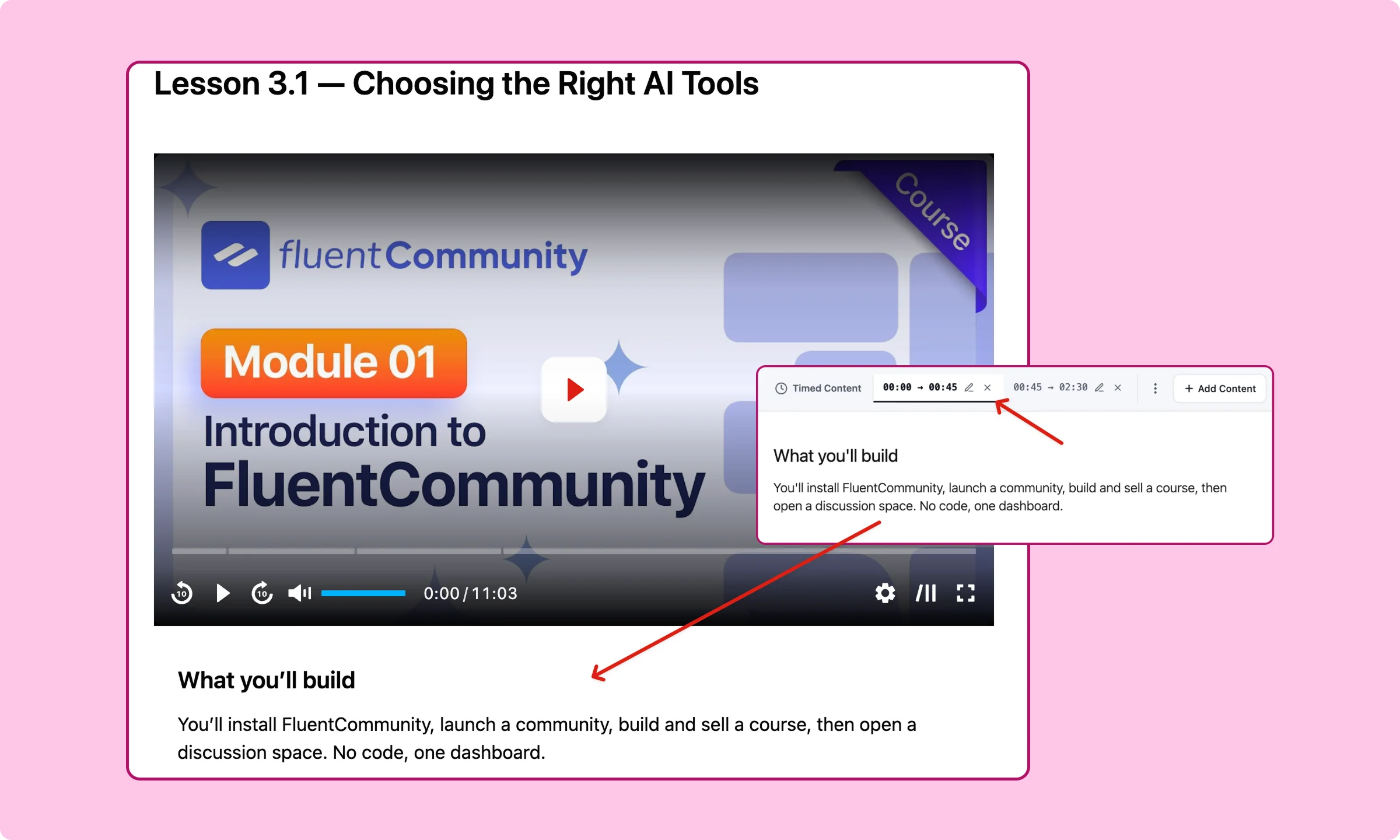
That’s a different approach from an overlay, which sits on top of the video and competes with it for attention. Timed content sits underneath instead, so a tutorial can show the exact snippet being discussed at that moment, or a product demo can surface the relevant spec the second it’s mentioned on screen.
I looked for something comparable on Presto Player’s side and didn’t find one. Chapters get a viewer to a section. Nothing changes what’s showing beneath the player as they watch.
Presets, quite equal on both sides
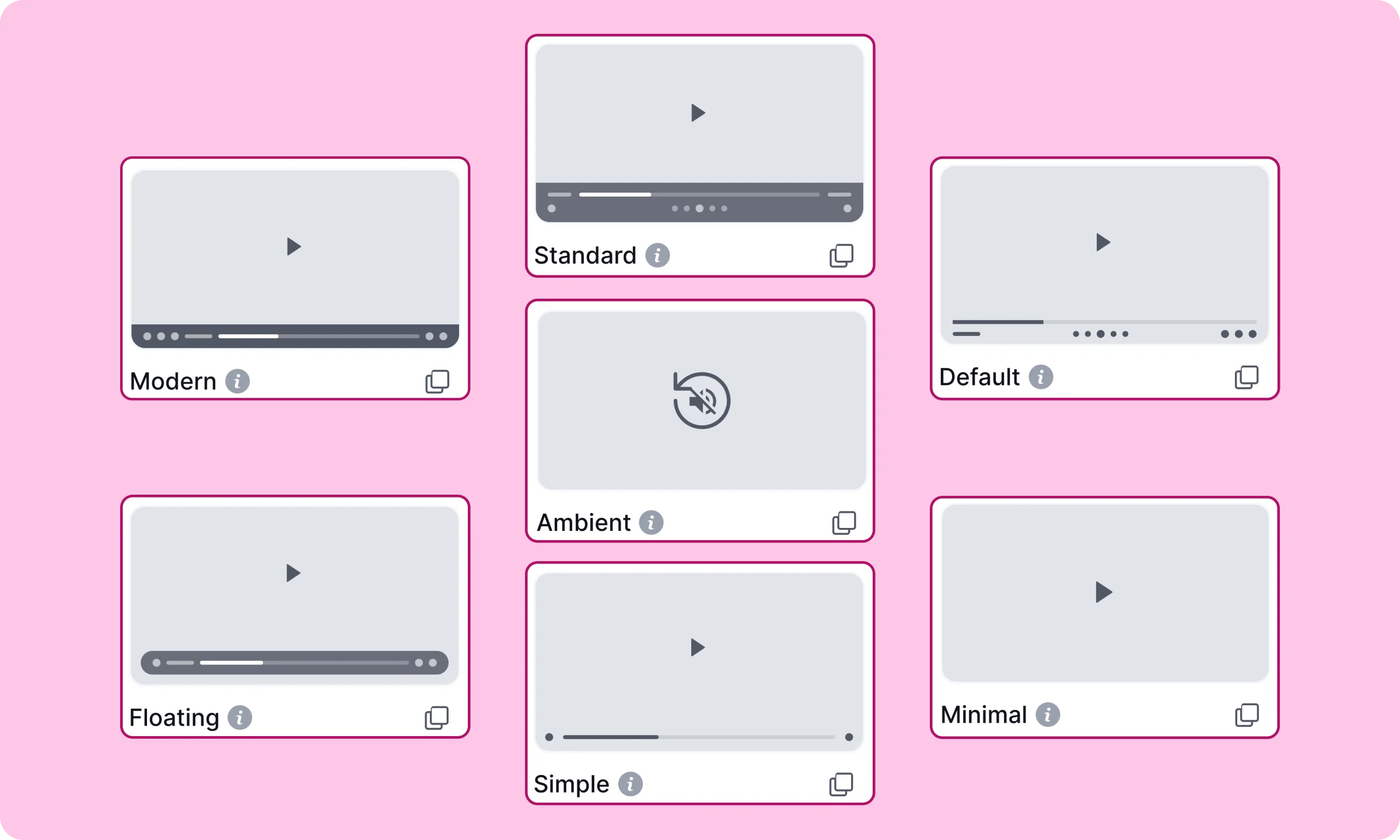
FluentPlayer offers a total of 7 presets, whereas Presto Player offers 5.
This isn’t a huge deciding feature for me, I guess these can be easily dealt with. Presto offers customizable preset on free, along with 5 presets, but adding a new preset is pro.
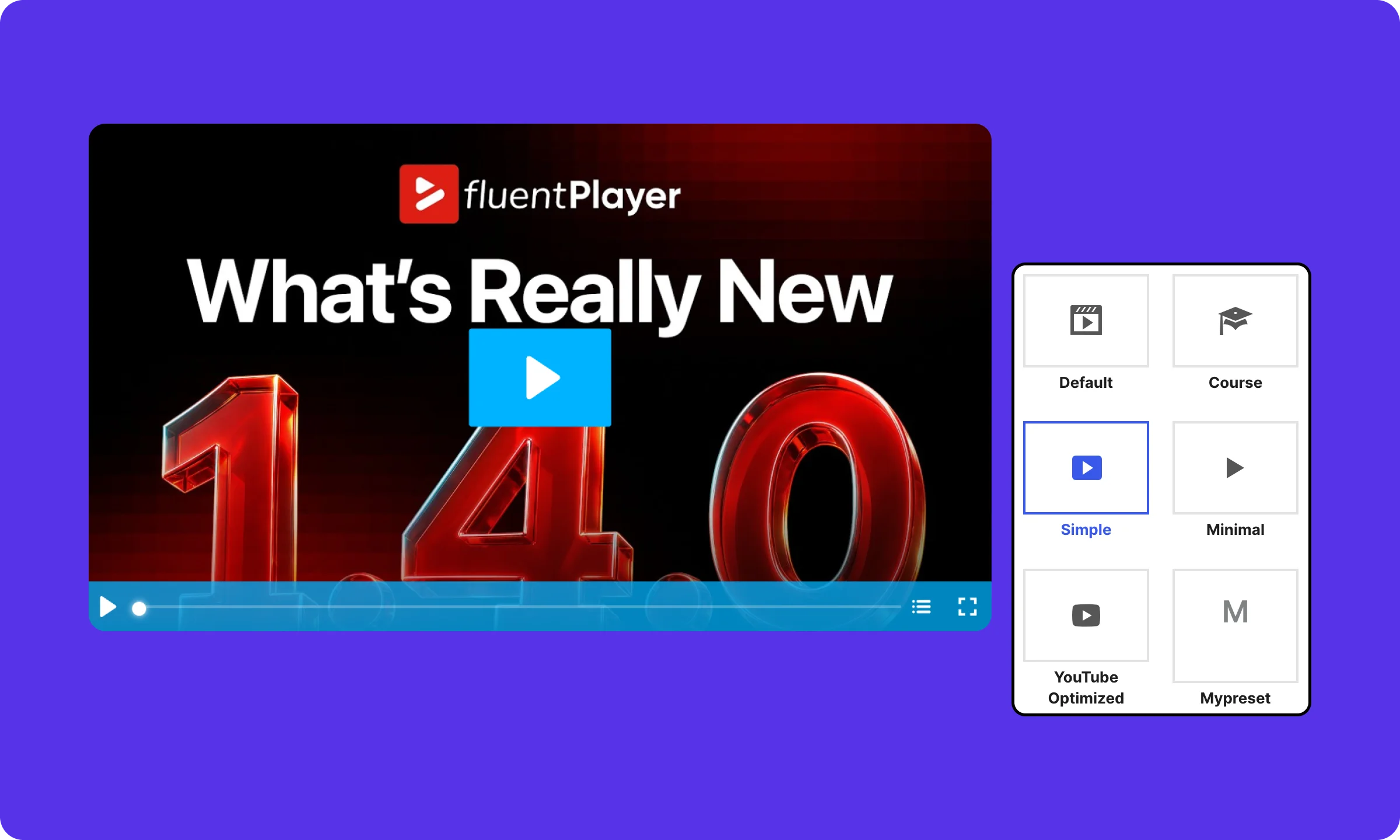
FluentPlayer ships six on the free plan, with a seventh, Ambient, and customizable presets reserved for Pro.
Video security and content protection
Content protection is a different question than everything above, less about starting out, more about protecting something valuable once you have it. Neither player makes a video impossible to copy, worth saying upfront before comparing what each actually does.
One thing I’ll flag on confidence: what I found on FluentPlayer comes from a source detailed enough to cite exact files and token lifetimes, and honest enough to admit when a feature doesn’t exist yet. What Presto Player documents is written for its own customers, in plainer language, without that depth. I’m stating Presto’s claims the way Presto describes them, not as something I’ve verified line by line myself.
Self-hosted video: FluentPlayer’s real gap
Here’s where FluentPlayer falls short if you’re not paying for a CDN: marking a video private blocks the normal player and the dedicated page for anyone without edit access, but it doesn’t protect the file itself. Anyone holding the direct upload URL can still open or download it. FluentPlayer’s own documentation says as much, and points you toward Bunny Stream, Mux, Gumlet, or Cloudflare Stream instead.
Presto Player describes something different for this exact case: each logged-in viewer gets a unique link tied to their session, and it stops working if shared. If that holds up the way they describe it, it’s a real advantage for anyone protecting self-hosted video without a CDN budget.
Learn to protect your course videos →
Dynamic watermark: Presto Player wins this one outright
Presto Player Pro adds a visible, movable text watermark, your site name or brand, that stays on screen through playback. FluentPlayer only has static logo and text overlays, nothing built to move or persist the way a real watermark does. I checked, there’s no equivalent feature in FluentPlayer right now. Calling a logo overlay a security feature would be overstating it, so I won’t. This one goes to Presto Player.
CDN coverage beyond Bunny.net
FluentPlayer Pro covers more ground here: signed, token-based protection across Bunny Stream, Mux, Gumlet, and Cloudflare Stream. One gap worth naming while I’m at it, Cloudflare R2 resolves to a public playback URL despite being listed as a source, so I wouldn’t treat it as secure. Presto Player’s documentation covers Bunny.net specifically. I couldn’t find anything on their side for Mux, Gumlet, or Cloudflare Stream to compare against.
Hosting integrations in FluentPlayer →
One more thing worth naming on its own
FluentPlayer strips tokens, signed URLs, and provider metadata from the page source before a password-locked playlist unlocks, so nothing leaks from inspecting the page early. I’m naming this as a FluentPlayer strength specifically, not a point of difference, since I have nothing confirming or denying the same for Presto Player.
None of this changes the free-plan story from earlier. But if video security is the actual reason behind your evaluation, especially self-hosted video without a CDN budget, Presto Player’s documented approach deserves a real look.
Who Presto Player is still the right call
None of this makes Presto Player the wrong choice for every situation, and it would be dishonest to write it that way.
Three groups get more from Presto Player than from FluentPlayer, even after everything above:
- Agencies running many sites purely for video presentation, with no CRM or marketing automation tied to any of them. The math favors Presto Player here: its lifetime plan runs $399 for 25 sites against FluentPlayer’s $599 for the same count, roughly $16 per site instead of $24. Paying more for integration depth you’ll never use is paying for nothing.
- Course or membership sites where the main fear is content leakage, not lead capture. The dynamic watermark and the documented per-session private links for self-hosted video are Presto Player Pro’s real strength, not a marketing line.
- Solo creators who want to pay once and stop thinking about tiers. Presto Player’s flat lifetime structure suits someone who wants one decision made and closed, rather than a tier ladder that might grow later.
- Anyone who wants an AI assistant managing video settings directly, right now. Presto Player shipped MCP support in version 4.4.0, letting Claude, ChatGPT, Cursor, or any MCP client connect to the plugin and work through natural language instead of the WordPress admin. FluentPlayer doesn’t have this yet, it’s on the roadmap, but it isn’t here, and that makes this a real edge for Presto Player until it ships.
What the Free Plan Actually Reveals
This is the part of any plugin comparison I pay closest attention to. Not the Pro tier feature war, every company stacks that with whatever justifies the price. What a company decides belongs in the free plan says more about who they think deserves to succeed first.
Here’s what each free plan actually includes, feature by feature:
| Feature | FluentPlayer Free | Presto Player Free |
|---|---|---|
| Self-hosted, YouTube, Vimeo sources | Yes | Yes |
| Autoplay | Yes | Yes |
| Muted autoplay specifically | Yes | No, Pro |
| Remembers playback position | No, Pro | Yes |
| Video presets | 6 presets | 5 presets |
| Independent branding colors (button, bar, background) | Yes | No, linked together |
| Logo branding | Yes | No, Pro |
| Video chapters | Yes | No, Pro |
| Email capture | Yes, independent of preset | No, tied to a Pro-only preset |
| Native CRM integration | Yes, FluentCRM | No, Pro, and third-party even then |
| Custom CSS | Yes | No, Pro |
| Floating player skin | Yes, included in a free preset | No, Pro |
A feature list only tells you what exists. Here’s what you can actually finish on the free plan alone:
| Task on the free plan | FluentPlayer | Presto Player |
|---|---|---|
| Capture a viewer’s email | Yes | No, capture itself isn’t available |
| Route that email into a CRM automatically | Yes, no extra tool needed | Not possible, capture isn’t available to route |
| Add chapters to a tutorial | Yes, drag-to-set with a live preview | No, Pro only |
| Add your logo to the player | Yes | No, Pro only |
| Independently adjust button and bar colors | Yes | No, linked together |
| Keep the player visible while a visitor scrolls (pip) | Yes | Yes |
It’s worth being fair here too, since a table like this can tip into a scoreboard if I let it. Presto Player’s free plan keeps one real thing FluentPlayer’s doesn’t: it remembers a viewer’s playback position automatically, no Pro tier required. Small, but not nothing to someone building longer-form video content.
Weigh that against the rest and the pattern still holds. One company decided a small business needs to be able to capture a lead before it needs a resumed playback position. The other decided the reverse. Neither is wrong on its own. But it says something that this is the exact question WPManageNinja’s other products, are built around answering the same way FluentPlayer did here.
When to Choose Which
If you’ve read this far, you already know I have a stake in this. But the honest answer isn’t one verdict, it’s which combination of things you’re actually trying to run. Here’s how the pieces from this comparison actually stack up against real situations.
Turning views into a CRM pipeline
This is the combination FluentPlayer is built around: an Email Capture layer, a native sync into FluentCRM, and a Media Milestone Reached or Layer Interaction trigger that starts an automation the moment someone watches far enough or clicks a layer. Add conditional visibility on top, and a returning contact never sees the same offer twice.
All of that is free. Presto Player’s version of this chain stops early: capturing an email needs the Pro-only, and even once FluentCRM is connected, also Pro on Presto Player, there’s no trigger and no targeting logic behind it. If this is the campaign, it’s FluentPlayer.
Building a structured course or onboarding sequence
Here the answer splits depending on what the course actually runs on. If it lives inside FluentCommunity, FluentPlayer’s native gating, chapters, and Timed Content, a synced resource block that changes under each lesson as it plays, cover the whole build on the free plan, with Timed Content the one Pro add if you want it.
And a plus point is FluentPlayer is also compatible with LearnDash.
If the course runs on LearnDash, Presto Player already has video progression tracking and remembered playback position free, two things that matter specifically on that platform and sit behind Pro on FluentPlayer. Chapters are still Pro on Presto Player either way. Which one wins here depends on whether resuming playback matters more to you, or running the course inside FluentCommunity does.
Protecting paid content from casual leakage
This is the one place hosting budget decides the answer more than either plugin’s feature list. Self-hosted with no CDN, and leakage is the real fear, Presto Player Pro’s documented per-session private links and dynamic watermark are worth checking first. FluentPlayer’s self-hosted protection genuinely doesn’t cover this the same way.
Already running Bunny Stream, Mux, Gumlet, or Cloudflare Stream, FluentPlayer Pro‘s signed-URL protection reaches all four. Presto Player’s documentation only covers Bunny.net specifically.
Running the same player across many sites, no marketing attached
If the job is video presentation only, no CRM, no community, no lead capture, across a real client list, the per-site math favors Presto Player’s lifetime plan, roughly $20 a site against FluentPlayer’s $24 at the same 25-site tier. Paying for integration depth that never gets used is the wrong trade here.
Optimizing video with real data
This one needs FluentPlayer specifically, not because Presto Player’s analytics are bad, but because this campaign requires granularity Presto Player’s dashboard doesn’t have: completion rate per video, a retention curve showing exactly where viewers drop off, device and location breakdown, and a new-versus-returning split.
Pair that with timestamp-precise interactive layers, and you can test where a layer actually performs best instead of guessing. Presto Player’s “Most Engaged Viewers” and “Most Watched” tables tell you who and what. They don’t tell you where in the video it stopped working.
If you need a verdict
If none of these five match exactly, here’s the honest fallback: don’t take my verdict as the deciding vote. FluentPlayer’s free plan already covers the CRM pipeline, the chapters, and the branding this whole comparison turned on. Install it, put a real video behind it, and see if it already does what your specific campaign needs before you spend anything.
Frequently Asked Questions
Is Presto Player free?
Yes, the base plugin is free on WordPress.org. But several features people expect on a free plan sit behind Pro: video chapters, logo branding, muted autoplay, and email capture.
Is FluentPlayer free?
Yes. The free plan includes video chapters, logo branding, independent color controls, email capture, and a native FluentCRM connection, the exact features this comparison found gated on Presto Player’s side.
Can I migrate from Presto Player to FluentPlayer?
FluentPlayer includes a built-in tool for importing existing Presto Player videos and settings.
Does FluentPlayer work with Elementor and Divi?
Yes, and natively on the free plan. FluentPlayer ships dedicated Elementor and Divi 5 modules rather than relying on a shortcode workaround.
Which is better for a LearnDash course?
It depends which matters more to you. Presto Player’s free plan includes LearnDash video progression tracking and remembered playback position. FluentPlayer offers the same progression tracking, but it sits behind Pro.
Do both connect to Google Analytics?
Yes. Both plugins support a GA4 connection alongside their own built-in analytics dashboard.
Previously published by Sarka Sarmin. Post updated by Sumit Karmakar.